
What Is Bookkeeping Software & Why Your Business Needs It?
When I first began setting up my small business, I didn’t realize how much easier life could be with the right bookkeeping software. Managing finances and cash flow manually was time-consuming, and I struggled to stay organized. Once I discovered the best software on the market, I understood that bookkeeping is more than just recording numbers, it’s about keeping your business financially healthy and efficiently running. From my own experience, using accounting software alongside bookkeeping tools gave me a clear view of where my money was going and how to optimize it.
The Difference between Bookkeeping vs. Accounting Software Explained
Core Purpose
Bookkeeping software helps with the identification, measurement, and recording of everyday financial transactions. It focuses on accuracy and organization, making it easier for small businesses to manage their finances efficiently.
Analytical Function
Accounting software, on the other hand, is designed to summarize and interpret financial data. It gives a holistic overview of a company’s financial health and status, helping business owners make calculated decisions for the future.
Integration and Collaboration
Modern applications often come with the ability to integrate with third-party tools. This ensures both bookkeeping software and accounting software can share information and remain in tune, improving workflow and reducing errors.
Practical Benefits
When used together, these systems offer overlapping features that strengthen your business operations. The result is better organization, smarter insights, and a holistic overview that supports sustainable growth and financial clarity.
Top Accounting Tools for Small Businesses in 2025
- Smart Financial Management: Simplifies bookkeeping, invoicing, and expense tracking.
- Automation: Handles repetitive tasks, saves time, reduces human error.
- Real-Time Insights: Offers financial reports, dashboards, and quick business decisions.
- Cloud-Based Access: Manage accounts anytime, anywhere with secure online access.
- Cost-Effective: Ideal for startups and small businesses on a budget.
- Data Security: Uses advanced encryption to keep client information safe.
How to Pick the Perfect Bookkeeping Software for Your Business?
Understanding Your Needs
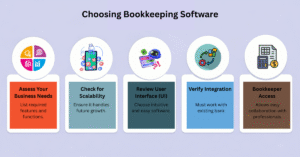
Before purchasing any home bookkeeping software or small business bookkeeping software, it’s important to analyze your needs and evaluate the aspects of each application. From my own experience, carefully comparing features, functions, and demands will help you find a tool that truly caters to your specific business goals and ensures efficiency in the long run.
Mobile Access for Flexibility
Having mobile access is essential today. Your bookkeeping software should offer a responsive website or smartphone application so you can check important financial information on the go. In a modern world, being able to access data anytime helps you harness the full potential of your system.
Cloud-Based for Efficiency
A cloud-based system keeps your data organized, boosts productivity, and allows easy access from any device or browser. Platforms like Netsuit offer cloud storage that helps manage invoices and documents seamlessly, making bookkeeping operations more efficient and connected.
Ease of Use and Support
Choose a bookkeeping application with good ease of use and reliable customer support. Avoid tools with a steep learning curve that waste time and money. Options like QuickBooks are known for being simple, efficient, and reliable, connecting your financial accounts smoothly while verifying a friendly support team is available when you need help.
Which Bookkeeping App Fits Your Business Best? Here’s How to Decide?
Comparing the Best Options in the Market
QuickBooks is one of the most popular personal bookkeeping software options in the market today. It’s well designed, user-friendly, and offers great invoicing and expense management features at reasonable prices, making it a solid choice for small businesses.
Exploring Flexible Apps for Businesses and Freelancers
For freelancers and growing companies, Netsuite provides flexibility to bill clients, generate invoices, and handle finances smoothly. It also integrates seamlessly with third-party applications, offering one of the finest solutions available at the moment for managing your business efficiently.
Essential Bookkeeping Features Every Small Business Must Have
Automated Expense Tracking
Good bookkeeping software should include automated expense tracking that can record and categorize expenses from bank feeds or receipts. This feature saves time, prevents manual entry errors, and keeps financial records organized and current, something I’ve found essential in managing multiple clients efficiently.
Invoicing and Payment Management
An effective system should offer invoicing and payment management options to create, send, and track professional invoices. The integration with online payment methods helps ensure faster collections and stronger cash flow management, allowing business owners to stay ahead on payments.
Financial Reporting and Insights
Reliable financial reporting tools provide clear insights through financial statements like profit and loss, balance sheets, and cash flow reports. These reports empower small business owners to make informed financial decisions and track performance with accuracy.
Tax Preparation and Compliance
Built-in tax preparation tools help maintain compliance by simplifying GST, VAT, and income tax calculations. They ensure local laws are followed, reduce errors, and make filing taxes easier and stress-free, a must-have feature for businesses aiming to stay financially healthy.
Best Free Accounting Software for Small Businesses in 2025
- Wave: Lets you estimate unlimited jobs and bill clients from anywhere, ideal for freelancers and startups.
- Zoho Books: A feature-rich accounting app for businesses earning $50,000 or less yearly, great for managing finances easily.
- ZipBooks: Helps manage client and vendor lists while allowing you to accept PayPal payments smoothly.
- NCH Express Accounts: Allows you to automate recurring orders and bills using offline bookkeeping tools.
- Akaunting: Enables you to customize a self-hosted or on-premise accounting system completely free of charge.
- BrightBook: Best for home-based business bookkeeping with simple billing tasks and tracking options.
- Manager: Lets you run payroll and track inventory through a free desktop accounting software platform.
- Odoo: Provides real-time data, helps track budgets, and measures profitability on both mobile and desktop apps.
- LedgerSMB: A free enterprise resource planning (ERP) system designed to scale your business efficiently.
- GnuCash: Offers strong privacy protection with desktop-based bookkeeping tools for secure financial management.
| Software Name | Key Feature | Accessibility | Best For | Special Function | Platform Type |
| Wave | Unlimited invoicing | Cloud-based | Freelancers & Startups | Billing from anywhere | Online |
| Zoho Books | Full accounting tools | Cloud-based | Small businesses | Track income & expenses | Mobile & Web |
| ZipBooks | PayPal integration | Online | Vendors & Clients | Expense management | Web |
| NCH Express Accounts | Offline bookkeeping | Desktop | Local businesses | Automate bills & orders | Windows/Mac |
| Akaunting | Self-hosted setup | Web-based | Tech-savvy users | Full customization | On-premise |
| Manager | Payroll & inventory | Desktop | Small enterprises | Comprehensive reporting | Offline |
| GnuCash | Privacy protection | Desktop | Home-based users | Secure financial tracking | Local software |
Top Open-Source Accounting Software for Total Customization
If you’re looking for flexibility and control, free online accounting software that’s open-source can be a great choice for small businesses. One popular option is the On-Premise Standard Plan, which allows unlimited invoicing and bill paying without any subscription fees. What I like most about open-source systems is that you can modify the code to match your business needs, making it a truly customizable accounting tool for those who want to manage things their own way. However, these systems are often best for solopreneurs with some tech experience.
Best Bookkeeping Tools Offering Free Trials You Can Try Today
Try Before You Buy
Many small business owners can take advantage of free trials to test bookkeeping tools before choosing a paid plan. This lets you explore how each platform fits your workflow and budget, helping you make a confident choice.
User-Friendly Dashboards
The best software includes user-friendly dashboards with simple interfaces and guided onboarding. You can easily track income, expenses, and reports, even if you’re not an accounting expert, making setup smooth and intuitive.
Full Feature Access During Trial
During the trial period, top-rated platforms like QuickBooks, FreshBooks, and Wave often provide full feature access to premium options such as invoicing, reports, and integrations. This helps you test all features before subscribing.
Smart Decision-Making
Trying multiple free trials allows you to compare usability, customer support, and platform features. This process not only saves time but also boosts accuracy, ensuring you invest in software that truly fits your business needs.
